Let's say we have the following folder and file structure and we would like to pass it as text in a MediaWiki page.
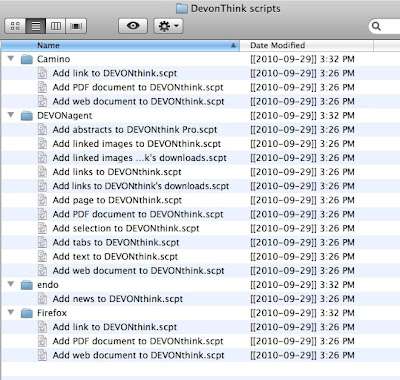 With the AppleScript of this post you can create automatically the necessary text, which is for our example the following:
The AppleScript code is the following:

===DevonThink scripts===As you can see the folder hierarchy is recreated as a hierarchy of MediaWiki sections. Also the number of files in each folder and its path are added under the name of the corresponding section. If you choose to apply this AppleScript in a folder structure with thousands of files there will no be any problem but it will take a long time to finish. The result is sent to the clipboard.
Number of files: 0<pre>/MBSystem/Users/MB/Downloads/DevonThink scripts/</pre>
====Camino====
Number of files: 3<pre>/MBSystem/Users/MB/Downloads/DevonThink scripts/Camino/</pre>
Add PDF document to DEVONthink.scpt<br/>
Add link to DEVONthink.scpt<br/>
Add web document to DEVONthink.scpt<br/>
====DEVONagent====
Number of files: 11<pre>/MBSystem/Users/MB/Downloads/DevonThink scripts/DEVONagent/</pre>
Add PDF document to DEVONthink.scpt<br/>
Add abstracts to DEVONthink Pro.scpt<br/>
Add linked images to DEVONthink's downloads.scpt<br/>
Add linked images to DEVONthink.scpt<br/>
Add links to DEVONthink's downloads.scpt<br/>
Add links to DEVONthink.scpt<br/>
Add page to DEVONthink.scpt<br/>
Add selection to DEVONthink.scpt<br/>
Add tabs to DEVONthink.scpt<br/>
Add text to DEVONthink.scpt<br/>
Add web document to DEVONthink.scpt<br/>
====Firefox====
Number of files: 3<pre>/MBSystem/Users/MB/Downloads/DevonThink scripts/Firefox/</pre>
Add PDF document to DEVONthink.scpt<br/>
Add link to DEVONthink.scpt<br/>
Add web document to DEVONthink.scpt<br/>
====endo====
Number of files: 1<pre>/MBSystem/Users/MB/Downloads/DevonThink scripts/endo/</pre>
Add news to DEVONthink.scpt<br/>
The AppleScript code is the following:
set folderContents to show_folder_hierarchy(choose folder, "=") of me2011-05-20 I updated the code which creates the POSIX paths of the folders.
set the clipboard to folderContents
--this subroutine is an expansion of an example from the book Learn AppleScript - The Comprehensive Guide to Scripting on Mac OS X (p. 485-486)
on show_folder_hierarchy(the_folder, the_indent)
--process this folder
tell application "Finder"
set folderContents to get files of the_folder
set numberOfFiles to count items of folderContents
set folderName to the_folder as alias
set folderNamePOSIX to get the POSIX path of folderName
set folderPATH to "<pre>" & folderNamePOSIX & "</pre>"
set fileNames to ""
repeat with currentFile from 1 to numberOfFiles
set fileNames to fileNames & name of item currentFile of folderContents & "<br/>" & return
end repeat
set the_result to the_indent & "==" & name of the_folder & "==" & the_indent & return & "Number of files: " & numberOfFiles & folderPATH & return & fileNames & return
end tell
--process each sub-folder in turn
tell application "Finder"
repeat with sub_folder_ref in (get every folder of the_folder)
set the_result to the_result & my show_folder_hierarchy(contents of sub_folder_ref, the_indent & "=")
end repeat
end tell
return the_result
end show_folder_hierarchy

